

Run every business. Miss no deadline.
Tamoogi keeps the permits, filings, tasks, documents, and money for every business you run in one place. Your AI assistant knows them all, and asks before it touches money or deletes anything.
30 days of Starter free · No card needed
- DTI
- SEC
- BIR
- LGU
- BFP
- DOLE
- FDA
AI assistant
An assistant that knows your business, and asks before it changes anything.
Ask in plain language. It reads the same tasks, requirements, and expenses you do, knows which documents go with each, tells you what matters this week, and can add tasks, log expenses, and more. Each change is shown on a card first, and nothing happens until you confirm.
- Answers from your own tasks, requirements, and expenses, and knows which documents go with each
- Every change it proposes is shown on a short card naming the exact record, and nothing happens until you press Confirm
- Several changes in one message go on one card, up to 10, and you can remove any before confirming
- Spending totals are calculated by Tamoogi, not guessed
- Attach a receipt photo and it reads the vendor, amount, and date before you say what to do
- Changes made through the assistant are marked “via Tamoogi Assistant” in your activity
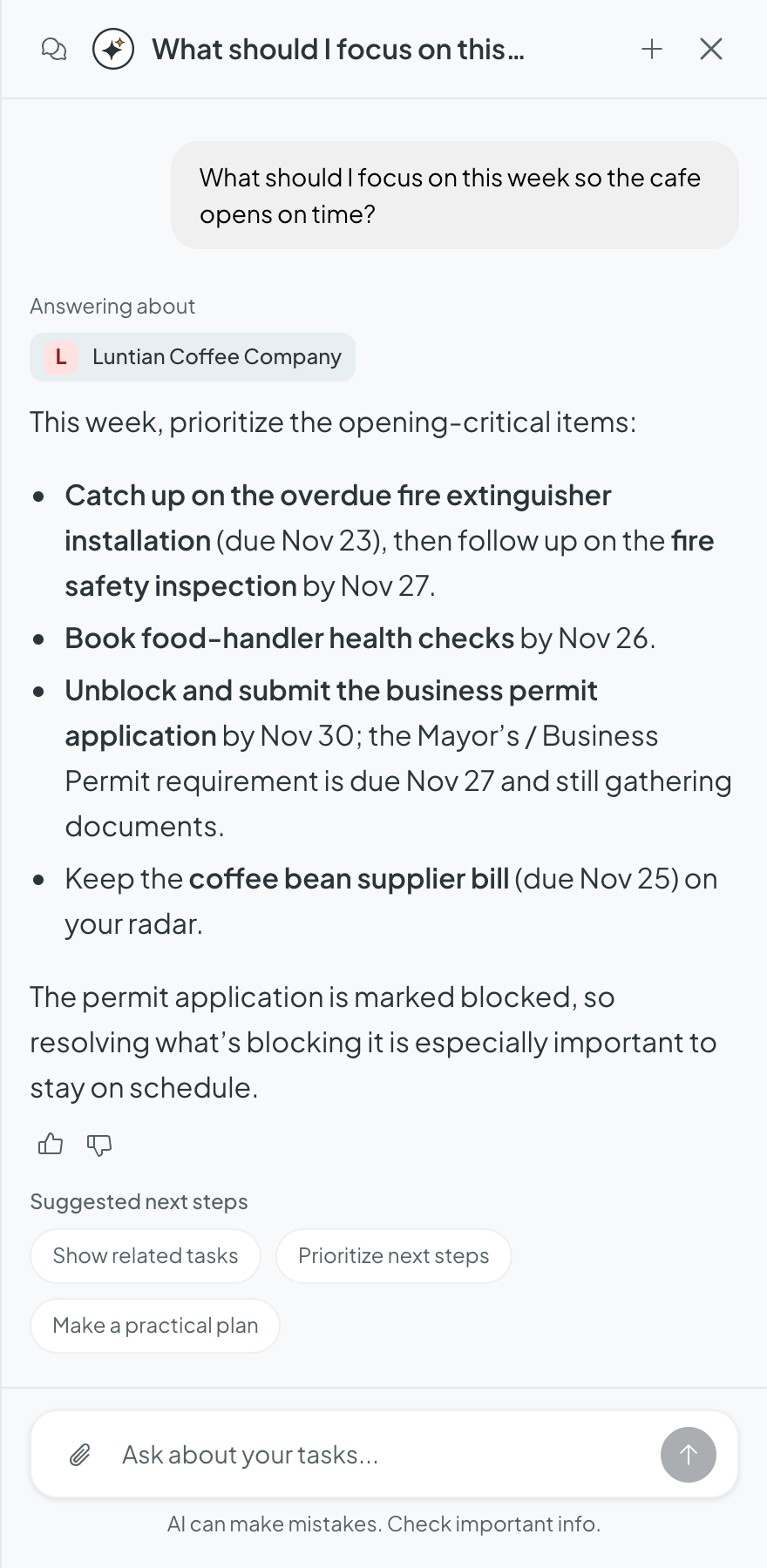
Ask what matters
It checks your real deadlines and statuses, then puts the week in order.
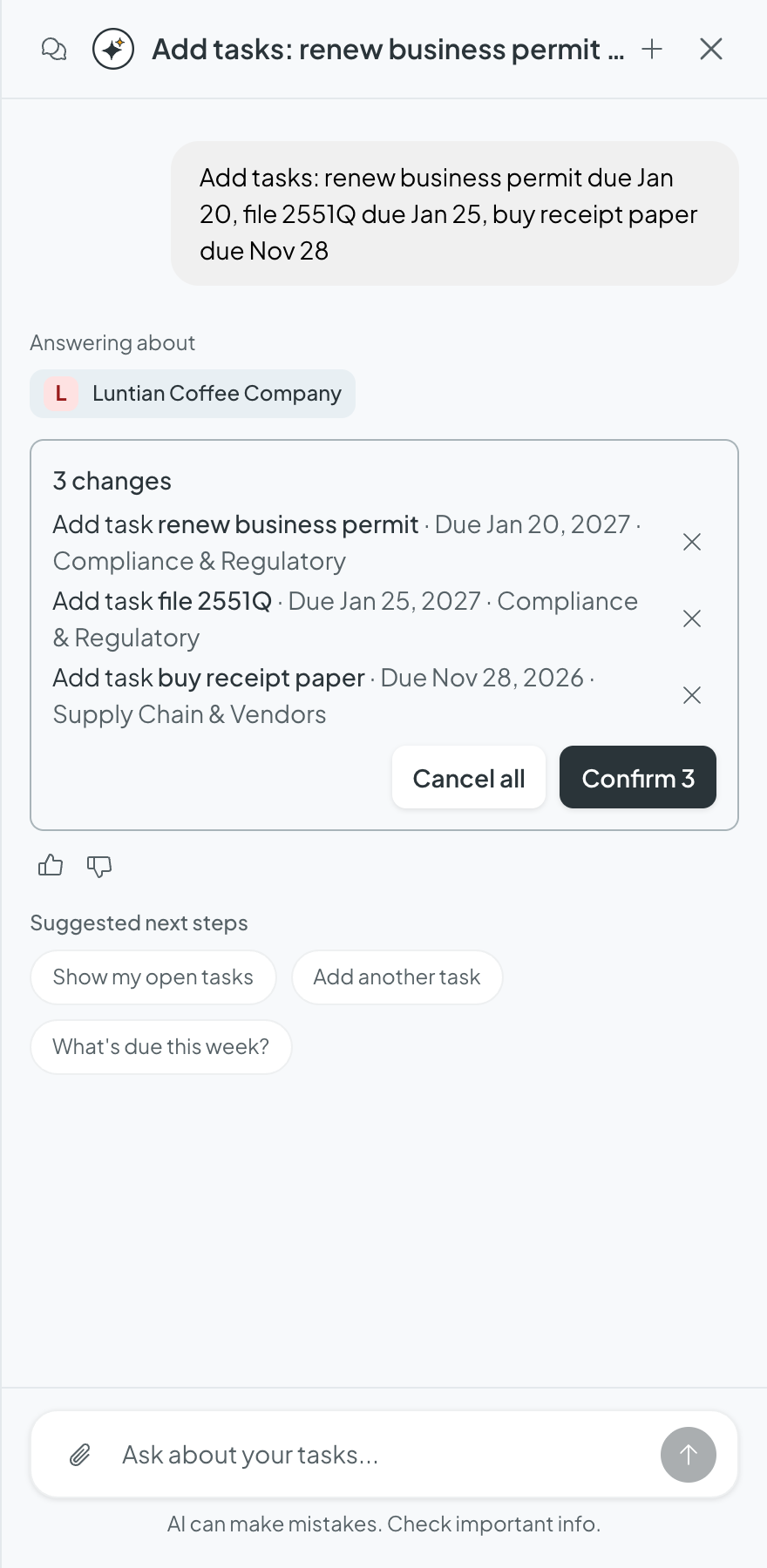
Confirm before anything changes
It drafts the change on a card that names the record. Nothing changes until you confirm.
Real replies from the app · Luntian Coffee Company, a fictional demo business · Excerpts
Everything a business has to keep up with.
Each business keeps its own records, so nothing gets mixed up between them.
Stay on top of every deadline
Requirements, tasks, and reminders, with what needs you today at the top.
-
Requirements
Permits, registrations, and renewals from DTI, SEC, BIR, your LGU, BFP, SSS, PhilHealth, Pag‑IBIG, DOLE, and more, with status and target dates.
-
Tasks
Owners, due dates, and subtasks in a list, on a board, or as an agenda.
-
Calendar
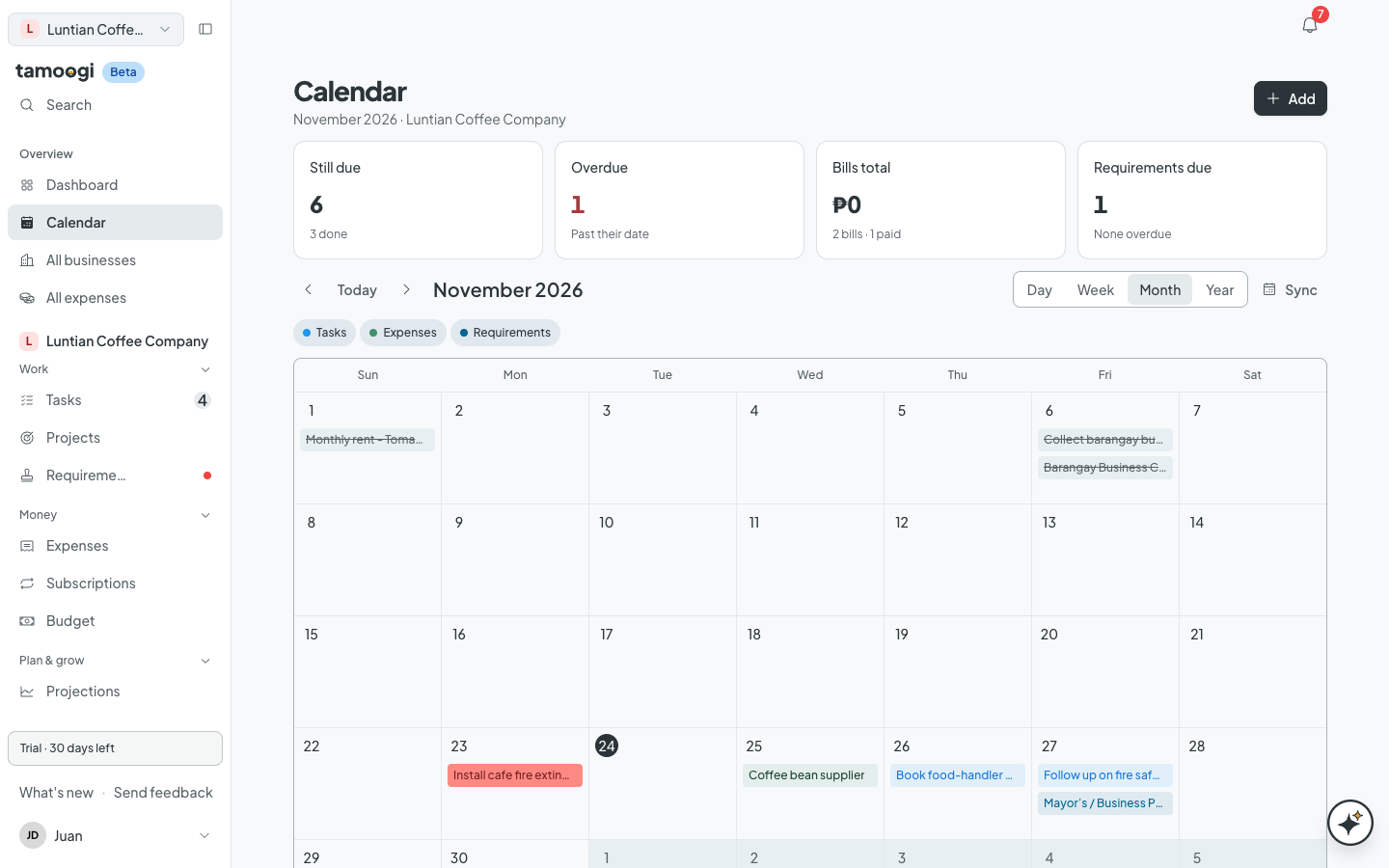
Every deadline across your businesses in day, week, month, or year view. Subscribe from Google, Apple, or Outlook calendar.
-
Reminders
Automatic reminders before deadlines and recurring payments, plus your own reminder on any task, requirement, or recurring expense. It stops once the work is done.
-
Today’s attention
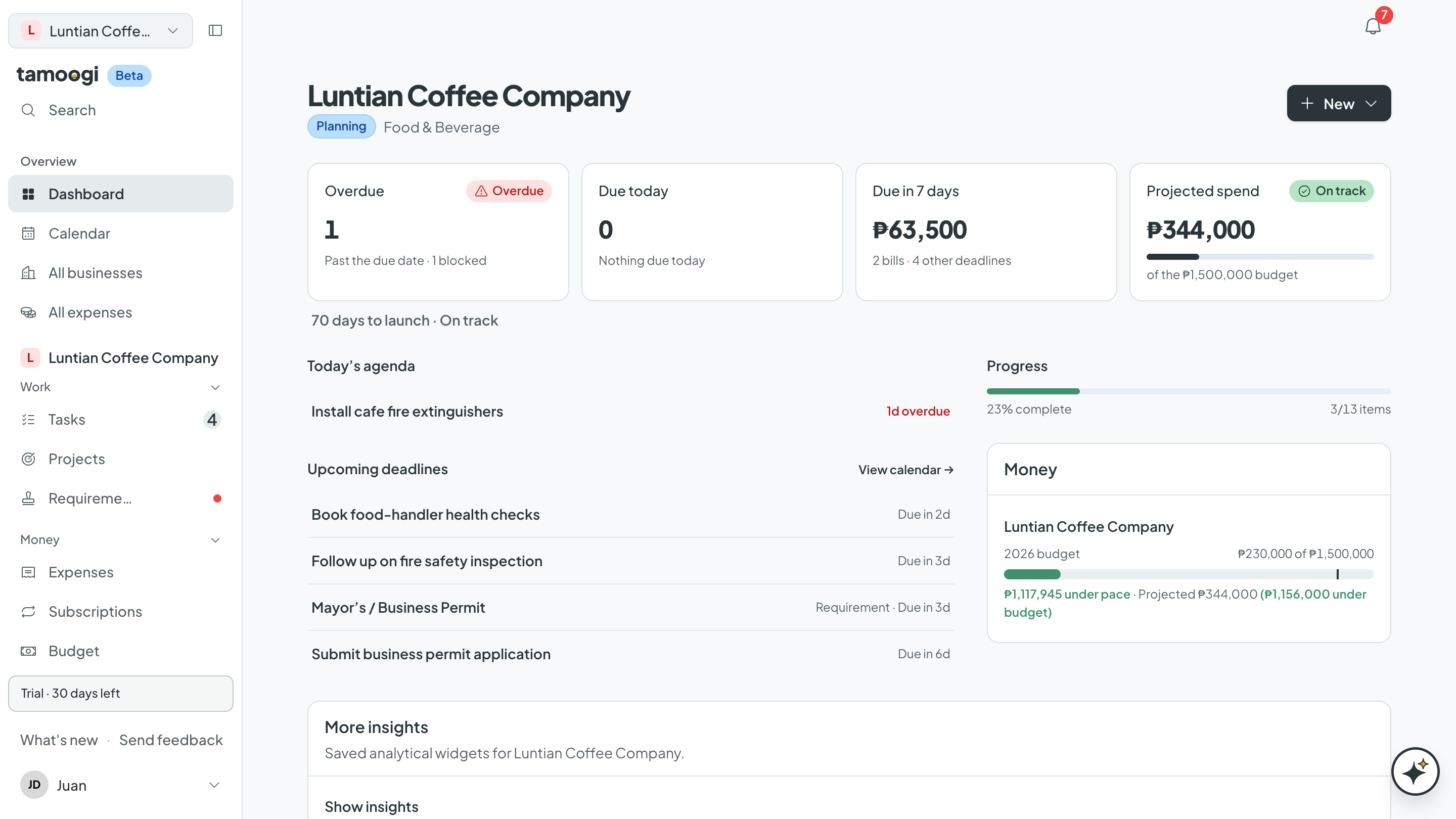
Your dashboard opens with what is overdue, due today, or blocked, then the deadlines coming up.
Keep the records together
Documents, people, and history stay with the business they belong to.
-
Documents
Permits, forms, and receipts kept with their task or expense, with version history on paid plans.
-
Contacts and knowledge base
Keep the people you deal with in one place, and a knowledge base of your own notes the assistant can search.
-
Collaborators
Invite a bookkeeper or staff, with separate access to documents, expenses, and financial reports.
-
Activity log
See who changed what, and who opened which file and when.
-
Connect your AI tools
Use Tamoogi from Claude, ChatGPT, or another MCP-compatible assistant, or send updates to your own systems with webhooks. On paid plans and the trial.
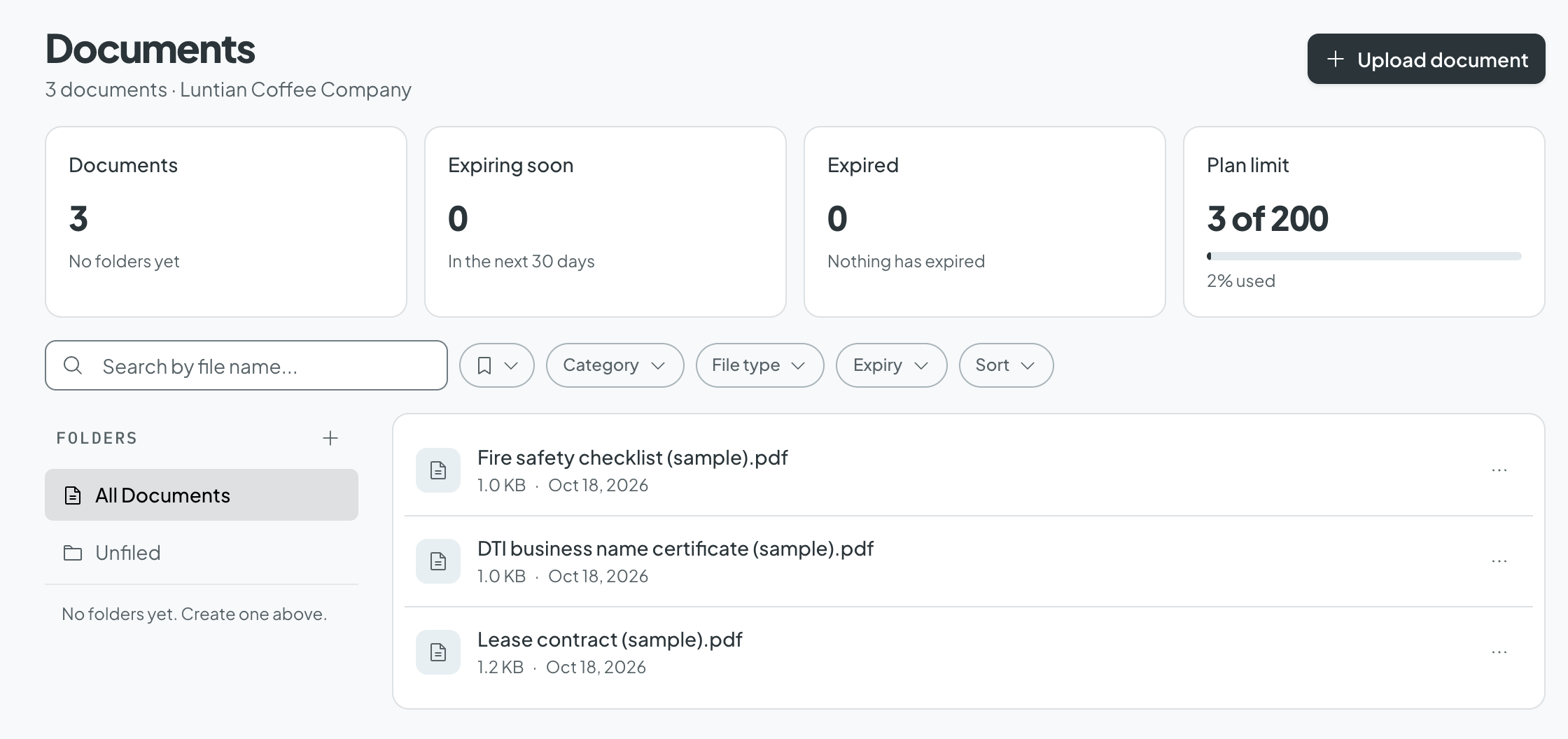
Know where the money goes
Costs, budgets, and plans for each business, side by side.
-
Expenses and budget
One-time and recurring costs, monthly budgets, and receipts the assistant reads for you.
-
Plan and grow
Projections, a profit planner for pricing and volume scenarios, and the key metrics you choose to track.
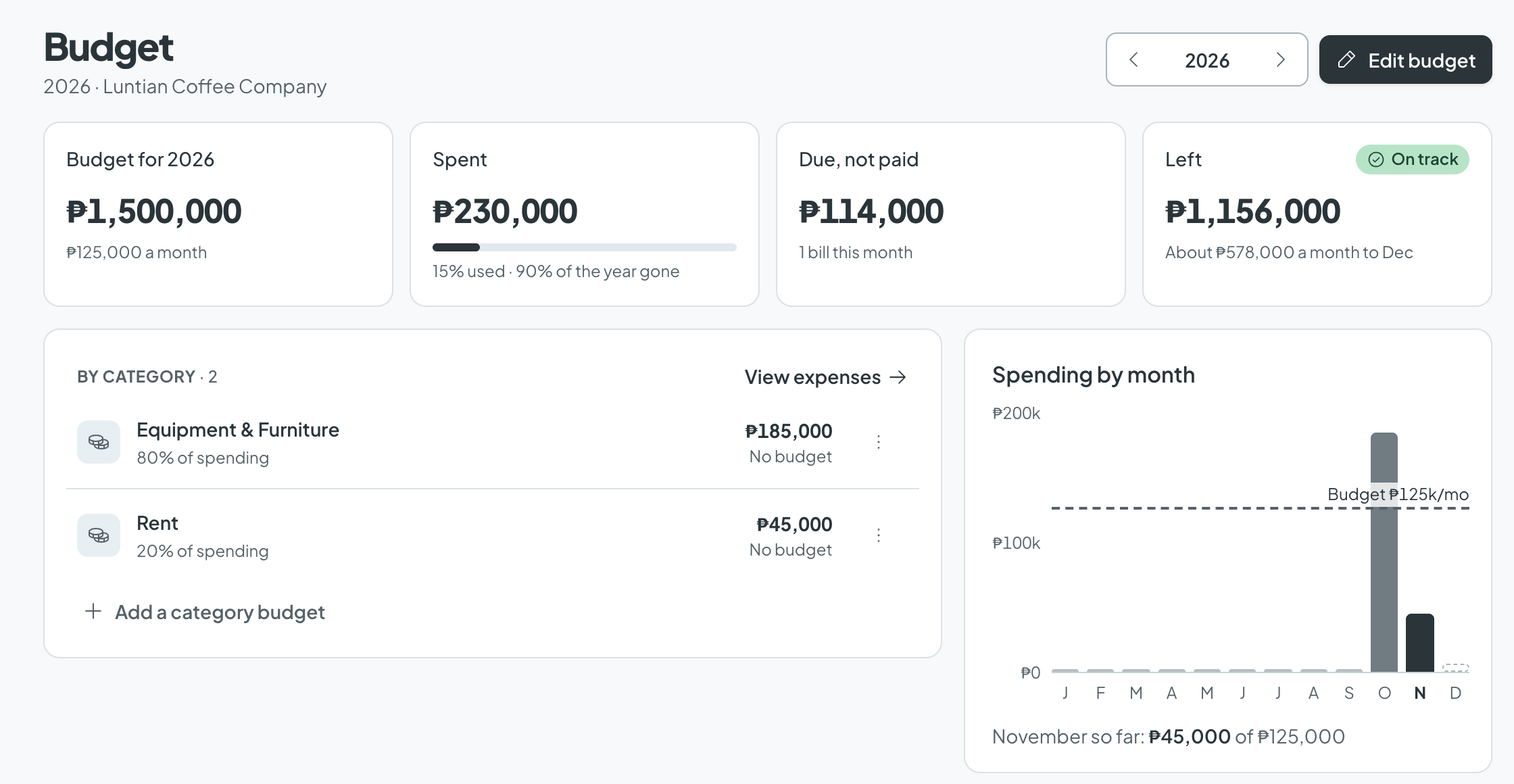
Inside the app.
Real screens from Tamoogi, following Luntian Coffee Company, a fictional Quezon City cafe getting ready to open.
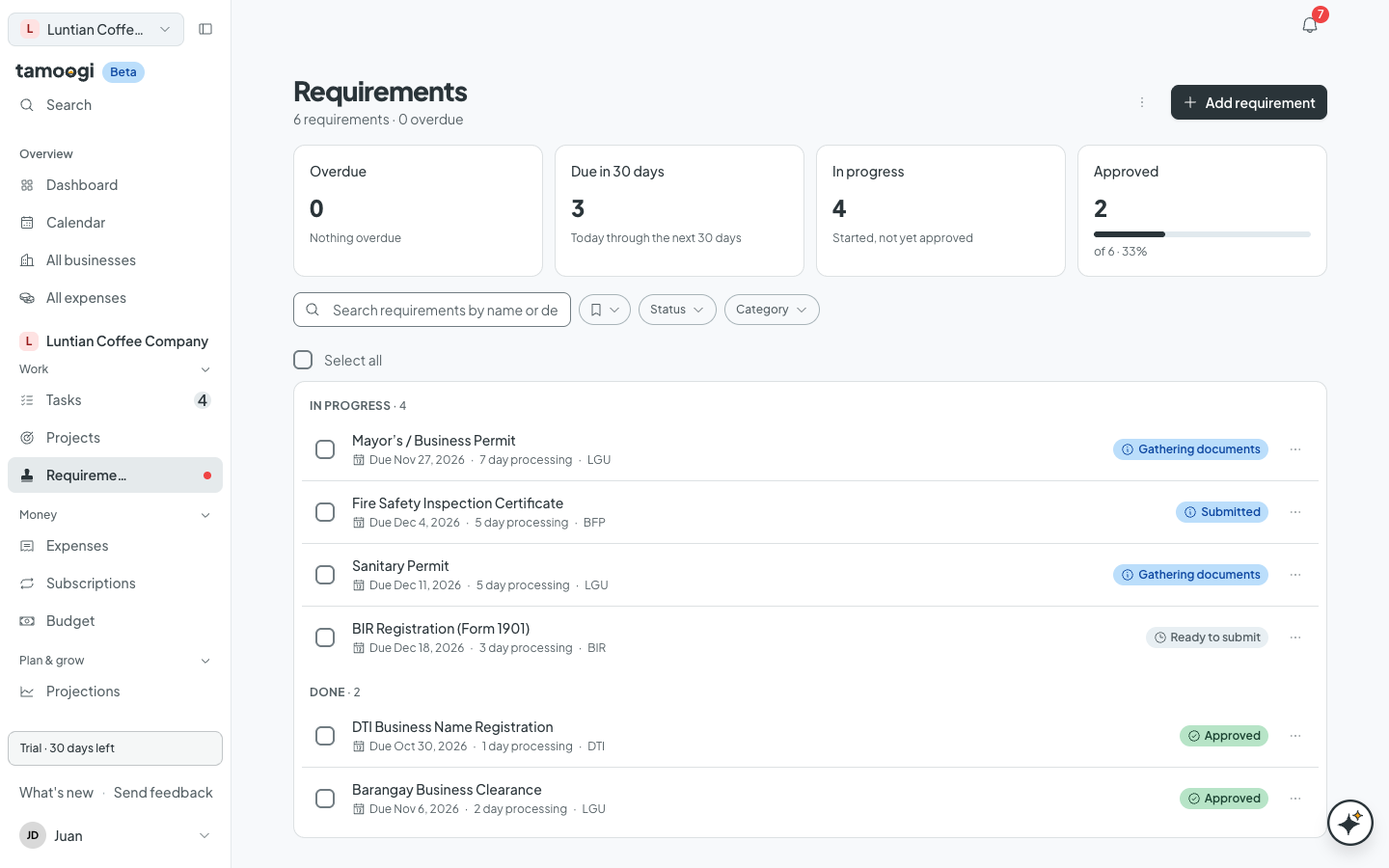
Every requirement, agency by agency
DTI, barangay, LGU, BFP, and BIR applications with status, processing time, and target date.
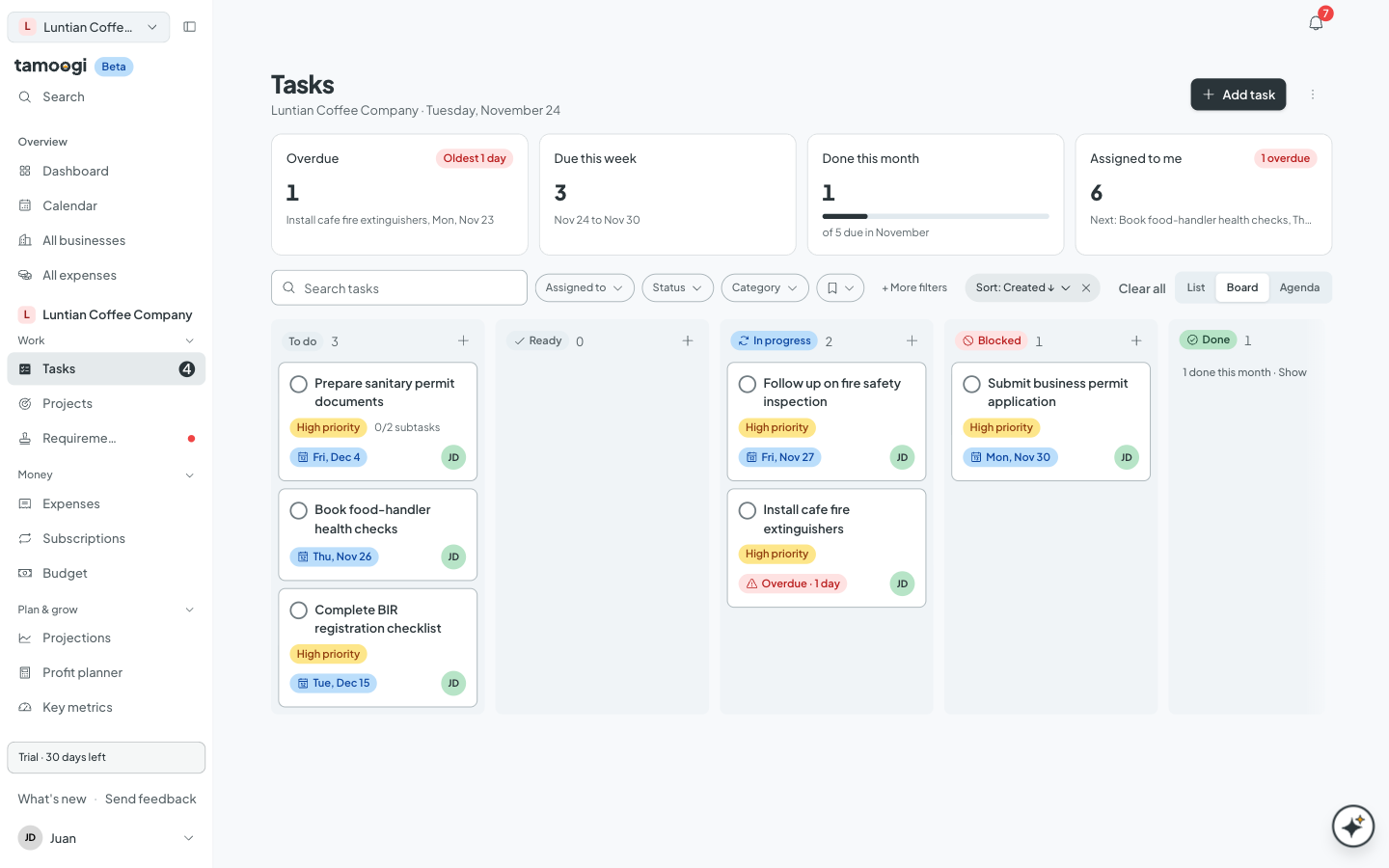
Work tracked to the last subtask
Owners, dates, status, and priority in a list, on a board, or as an agenda.
One calendar, every business
Tasks, expenses, and requirements on a single schedule.
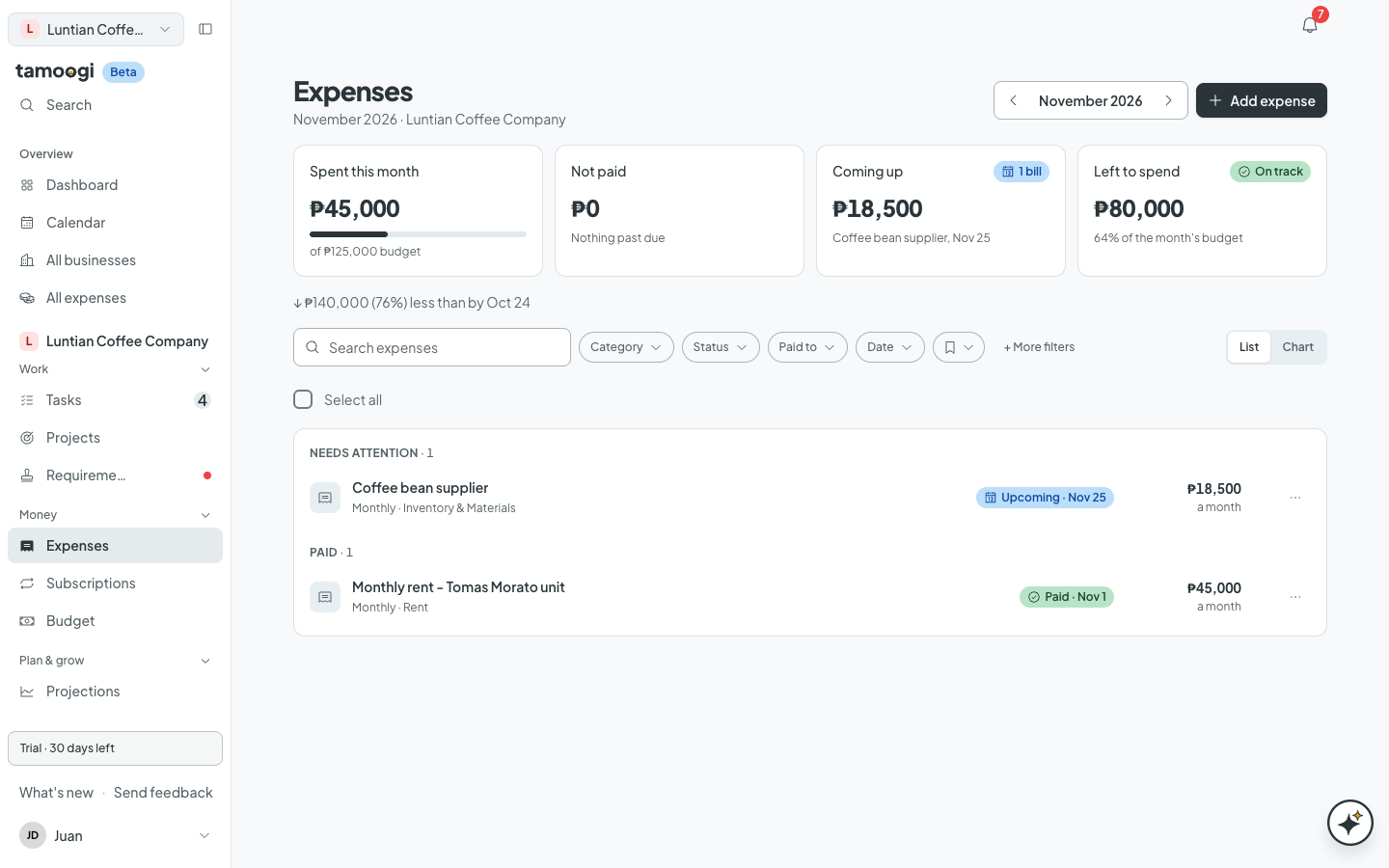
Every cost in one list
One-time and recurring costs with due dates, receipts, and the budget they count against.
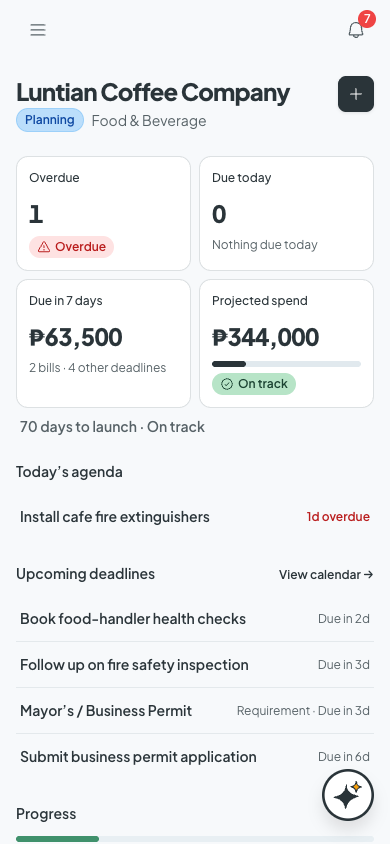
Readable on the phone
See what is overdue and due next from wherever you are.
Luntian Coffee Company · Fictional demo business · Dates are planning targets, not official deadlines
Built for the businesses Filipinos run.
Different businesses, different paperwork. Tamoogi keeps each one’s list.
-
Cafes, shops, and food businesses
Mayor’s permit, sanitary and fire safety certificates, BIR registration, and the opening checklist, each with its documents.
-
Online sellers
DTI, BIR, and LGU registration, quarterly percentage tax, and the costs of ads, couriers, and stock.
-
Freelancers and professionals
1701Q every quarter, Form 2307 from clients, PTR renewal, and the subscriptions you pay monthly.
Every product screen on this page is a real capture.
Plans that grow with your business.
Start with 30 days of Starter free, no card needed. Prices are in Philippine pesos: pay monthly, or yearly and get 2 months free.
Free
₱0
Free forever
No card needed
Try the basics for one business.
Start free- 1 business
- 40 open tasks
- 30 new expenses a month
- 10 documents
Starter
₱599 /month
or ₱5,990 a year
2 months free
Get one business organized with a small team.
Start free trial- 1 business
- 2 users
- 1 collaborator per business
Growth
Most popular₱1,499 /month
or ₱14,990 a year
2 months free
Grow across businesses with your team.
Opens soon- 3 businesses
- 5 users
- 4 collaborators per business
Scale
₱2,999 /month
or ₱29,990 a year
2 months free
Coordinate a larger team and business portfolio.
Opens soon- 10 businesses
- 15 users
- 14 collaborators per business
Every paid plan includes document version history, full data export, MCP connections, and webhooks. If you don't pick a plan when the trial ends, your account moves to the Free plan. Paid plans open soon. Until then, start with the free 30-day Starter trial.
Tamoogi keeps you on time and organized. Filing your returns stays with you or your accountant, and Tamoogi has your deadlines and documents ready when you do.
How AI credits work
Every AI action uses 1 credit, and there are no automatic overage charges.
- Credit use
- Assistant replies, receipt reads, and knowledge imports each use 1 credit from your monthly allowance. The Free plan gets 15 AI actions a week instead.
- Rollover
- Eligible unused credits can roll over for up to one month.
- More capacity
- Need more AI credits? Paid plans can add a pack of 100 for ₱99 or 500 for ₱399. Pack credits last 12 months. Need more businesses or users? Move up to a bigger plan.
Your documents stay private to your business
Permits, receipts, and filings are sensitive. Here is what protects them. How we protect your data
- Private by default
- In the app, files are only visible to the people you give access to in that business.
- See who opened what
- Every file download is recorded in the business’s activity log, with who opened it and when.
- Backed up every day
- Your records are copied to encrypted daily backups, stored away from our main servers.
- Your data is never locked in
- Export everything as a ZIP of JSON and spreadsheet-ready CSV, on every paid plan and during your trial.
- You stay in control
- Turn AI features off per business, or delete your account and have your files erased 30 days later.
- Payment details never reach us
- When paid plans open, you’ll pay on PayMongo’s checkout, so we never receive or store your payment details.
See your BIR deadlines in a minute
Answer four questions to see which BIR returns your business files this year and when each one is due. Free, no sign-up.
Check your deadlinesPaying staff in December? Use the 13th month pay calculator.
- 15Apr 1701A Annual income tax return
- 17May 1701Q Quarterly income tax return
- 16Aug 1701Q Quarterly income tax return
Example: a sole proprietor on the 8% income tax.
Useful reading for the paperwork days.
Plain-language guides to registration, tax choices, and recurring compliance in the Philippines.
-

-

-

-

-

-

Common questions.
Quick answers about the trial, pricing, and how Tamoogi handles your records.
What is Tamoogi?
Tamoogi is your smart digital business partner. It keeps Filipino business owners organized and up to date on everything a business needs: permits and filings, tasks, documents, and money. A built-in AI assistant answers from your own records.
How does the free trial work?
Every new account can start one free 30-day Starter trial, and no card is needed. Add your first business and start tracking its requirements, tasks, documents, and expenses. When the trial ends, choose Starter, Growth, or Scale, or stay on the Free plan with 1 business and smaller limits.
What can the AI assistant do?
Ask it in plain language what is due or what to focus on, and it answers from your tasks, requirements, and expenses, and knows which documents go with each. Attach a receipt photo and it reads the vendor, amount, and date. It can also create tasks, log expenses, and set reminders when you ask. Every change it proposes is shown to you first on a card, and only happens after you press Confirm.
How much does Tamoogi cost after the trial?
Starter is ₱599 a month for 1 business and 2 users. Growth is ₱1,499 a month for 3 businesses and 5 users. Scale is ₱2,999 a month for 10 businesses and 15 users. Pay yearly and get 2 months free: ₱5,990, ₱14,990, or ₱29,990 a year. The Free plan stays free for 1 business with up to 40 open tasks, 30 new expenses a month, and 10 documents. Reaching a Free limit never removes anything you saved. Need more businesses, users, or AI credits? Move up to a bigger plan, and paid plans can add an AI credit pack. Paid checkout opens soon.
Which government requirements can I track?
You can track permits, filings, and renewals with their due dates and processing times, including requirements from DTI, SEC, BIR, your LGU, BFP, DOH, SSS, PhilHealth, Pag-IBIG, DOLE, FDA, PRC, DENR, and more. Every deadline also appears on one calendar across your businesses.
Will Tamoogi remind me before deadlines?
Yes. Tamoogi reminds you in the app and by email 7, 3, and 1 day before a requirement is due, 1 day before a task or recurring payment is due, and when any of them becomes overdue. In the app you also get a heads-up 3 days before a task is due. A weekly summary email is on by default, and you can switch it to daily. You can also set your own in-app reminder on any task, requirement, or recurring expense, and it stops on its own once the work is done. Your dashboard also opens with what is overdue, due today, or blocked. On the Free plan, reminder emails are limited to 10 a month, but urgent ones always go out: overdue tasks and requirements, and requirements due within 3 days.
Can I manage more than one business?
Yes. Each business keeps its own requirements, tasks, documents, and expenses, so records do not get mixed. Growth covers 3 businesses and Scale covers 10; a bigger plan gives you more room.
How do AI credits work?
Paid plans include monthly AI credits: 200 on Starter, 800 on Growth, and 2,500 on Scale. The Free plan includes 15 AI actions a week. Each assistant reply, receipt read, or knowledge import uses 1 credit. Eligible unused credits can roll over for up to one month, there are no automatic overage charges, and paid plans can top up with a pack of 100 credits for ₱99 or 500 for ₱399. Pack credits last 12 months.
Can I invite my bookkeeper or staff?
Yes. You can invite a bookkeeper, staff member, or co-founder to a business and choose their permissions. Documents, expenses, and financial reports are separate, so a bookkeeper can record expenses without seeing your other files. Owners can change or remove access at any time.
Does Tamoogi file my taxes or permits for me?
No. Tamoogi is a tracking and organizing tool. It does not file returns, pay taxes, or deal with government offices for you, and it is not legal or tax advice. It keeps your deadlines, documents, and costs in order so you or your accountant can act on time.
Can I use Tamoogi from Claude or ChatGPT?
Yes, on paid plans and during the trial. Connect Claude, ChatGPT, or another MCP-compatible assistant from Settings, and it can read and update your businesses with the same access you have.
Are my documents private?
Uploaded files are kept in private, encrypted cloud storage and can only be opened by people you give document access to in that business. Every download is recorded in the activity log, and your records are copied to encrypted daily backups. When paid plans open, you’ll pay on PayMongo’s checkout, so Tamoogi never receives or stores your payment details.
What does the AI assistant see?
Only the business records you yourself can access. When it looks up your records, card numbers, Philippine TINs, and passwords or access keys are removed before anything is sent to the AI model. Business owners can turn AI features off for a business at any time.
Can I take my data with me?
Yes. On every paid plan and during your free trial, you can export everything in your businesses as a ZIP file of JSON and spreadsheet-ready CSV. You can also delete your account; 30 days later your files, AI conversations, and knowledge entries are deleted and your personal details are erased.
Make the next deadline easier to handle.
Get 30 days of Starter free, no card needed, and put your first business on the board.